VRM Phase Counts: The Spec That Motherboard Makers Use to Justify Big Price Jumps (And When It Actually Matters)
Walk into any PC hardware forum and you'll find someone confidently declaring that more VRM phases equals better performance, full stop. It's one of those spec-sheet talking points that sounds authoritative, gets repeated constantly, and — like a lot of hardware conventional wisdom — turns out to be way more nuanced once you actually stress-test it.
We spent time putting several MSI boards across different price brackets through their paces to find out where additional phases genuinely help, where they stop moving the needle, and where you might be dropping an extra $80 on paper specs that your gaming workload will never actually stress.
What VRM Phases Actually Do (Quick Refresher)
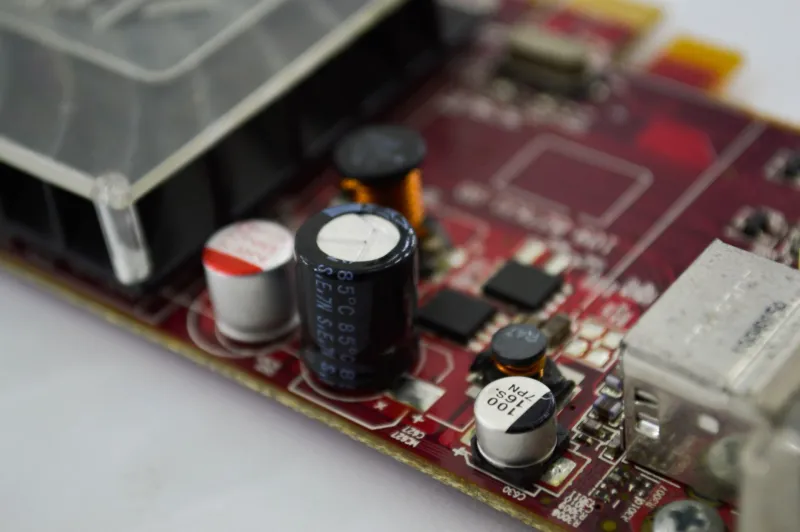
The Voltage Regulator Module on your motherboard is responsible for converting the 12V power from your PSU into the clean, stable, lower-voltage power your CPU needs. A multi-phase VRM splits that job across multiple power stages — each phase takes a turn delivering current, which distributes heat, reduces ripple, and keeps the whole system running smoother under load.
More phases mean each individual stage works less hard, runs cooler, and theoretically delivers cleaner power. That's the pitch, anyway. And it's not wrong — it's just incomplete.
The Marketing Layer on Top of the Real Specs
Here's where things get a little murky. Phase count numbers in spec sheets don't always reflect what's actually happening on the board. A lot of modern motherboards use phase doublers — components that take a single physical phase and split it into what looks like two on paper. So a "16-phase" board might actually be running 8 true phases through doublers.
MSI is pretty upfront about their topology across most of their lineup, which makes comparing boards within their ecosystem more straightforward than it is across brands. But you still need to look past the headline numbers. A board listed with more phases isn't automatically better than one with fewer if the underlying power stages are lower quality or the doublers are doing most of the heavy lifting.
Where Budget MSI Boards Actually Hold Up
Testing lighter workloads — standard 1080p and 1440p gaming, nothing exotic — the performance differences between MSI's entry-level and mid-range boards were basically invisible. Frame rates were within margin of error. Temperatures on the CPU stayed comparable. The budget boards handled the load without breaking a sweat.
For a Ryzen 5 or Core i5 build running games like Call of Duty, Valorant, or even something more demanding like Cyberpunk 2077 at quality settings, the VRM on a more affordable MSI PRO or MAG board isn't a bottleneck. It's doing its job fine. The idea that you need flagship-tier power delivery to game well on a mid-range CPU is largely a myth that benefits the people selling you more expensive motherboards.
Where the Higher Phase Counts Start Earning Their Keep
The calculus changes pretty quickly once you move into high-TDP territory. Pairing a board with a power-hungry processor — think a Ryzen 9 or an Intel Core i9 running near its power limits — is where VRM quality stops being a theoretical concern and becomes a practical one.
Under sustained all-core loads, the thermal difference between a well-specced VRM and a budget one becomes real. Boards with more robust power stages and better heatsink coverage run cooler, which means they're less likely to throttle during extended gaming sessions or content creation work that keeps the CPU pinned.
If you're overclocking, the math shifts even further. Pushing a chip past stock settings demands more from the VRM, and that's when having genuine, high-quality phases — not just a high number of them — pays off. MSI's MEG and MPG tier boards are built for this use case, and the engineering shows when you're actually stressing the system.
The Sweet Spot Most Gamers Actually Land In
For the majority of US gamers building a dedicated gaming rig around a mainstream CPU, the sweet spot sits comfortably in the mid-range. An MSI MAG or MPG board with a solid 6 to 10 true power stages, decent heatsinks, and quality MOSFETs is going to handle everything you throw at it without complaint.
You're not leaving performance on the table with that kind of setup. You're just not paying a premium for headroom you'll never use.
Where it makes sense to spend up is when your build is actually going to push those limits — a flagship CPU, aggressive overclocking goals, or a machine that doubles as a workstation running heavy compute loads alongside gaming. In those cases, the investment in a more capable VRM is real, not just marketing.
The Spec to Actually Watch
Instead of fixating on phase count, pay closer attention to the power stage rating — specifically the current rating per phase (measured in amps). A board with 8 phases rated at 60A each is genuinely more capable than one with 16 phases rated at 30A each, even though the second one sounds more impressive on a spec sheet.
MSI publishes this information for most of their boards if you dig into the product pages and cross-reference the component datasheets. It takes a few extra minutes, but it gives you a much clearer picture of what a board can actually handle versus what the marketing is implying.
Bottom Line
VRM phase counts are a real spec that reflects real engineering decisions — but they've also become one of the easier levers for motherboard manufacturers to pull when they want to justify a price jump. The honest answer for most gamers is that the phase count on a mid-range MSI board is already more than enough for what they're actually doing.
Know your CPU, know your use case, and don't let a big number on a box talk you into spending money on power delivery headroom you'll never come close to needing. If you're running a mainstream chip and mostly gaming, your budget is better spent elsewhere in the build.