Does a $200 Gaming Mouse Actually Play Better? We Put MSI's Mid-Range Pick to the Test
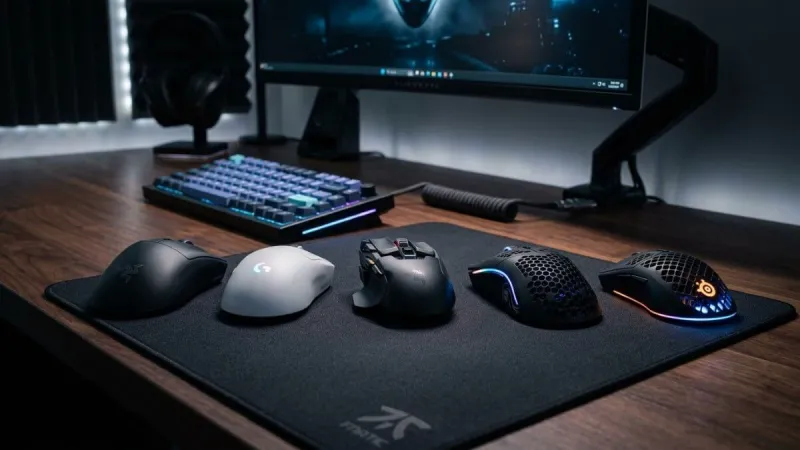
Photo: gaming mouse comparison side by side on desk mousepad, via gimaxo.com
Let's be honest about something uncomfortable: most gaming mice that cost more than $80 are not dramatically better at the thing mice are supposed to do — move a cursor accurately across a screen. The sensor technology in a $40 Pulsar or Endgame Gear mouse is legitimately excellent in 2025. So when a brand like MSI asks you to spend $200 on a mid-range gaming mouse, they'd better have a compelling answer to the obvious question: why?
We spent several weeks using MSI's Clutch GM51 Lightweight Wireless alongside a rotating cast of budget competitors — specifically the Pulsar X2V2 (around $50) and the Endgame Gear XM2we (around $70) — across a range of real gaming scenarios. Here's what we actually found.
The Sensor Story: Closer Than You'd Think
All three mice in this comparison use high-tier optical sensors. The GM51 runs a PAW3395, which is about as good as consumer mice get right now. The Pulsar and Endgame Gear options use PAW3395 or PAW3370 variants depending on configuration. In a blind sensor test, moving between these three mice while playing Valorant or Apex Legends, we genuinely could not reliably identify which was which based on tracking feel alone.
That's not a knock on MSI — it's a reflection of how good budget sensor tech has gotten. If your purchase decision comes down to "which mouse will track more accurately," the honest answer in 2025 is that all three of these will track accurately enough that your aim will be the limiting factor, not the hardware.
Where the GM51 does pull slightly ahead is in wireless latency consistency. Over extended sessions, the connection felt rock solid, with zero of the occasional micro-hiccups we noticed on the Pulsar's 2.4GHz dongle in a crowded wireless environment (our test space has a lot of competing signals). For tournament-level competitive players, that consistency matters. For most people gaming at home, it probably won't.
Build Quality: This Is Where the Price Gap Gets Justified
Hold the GM51 and then hold a $40 mouse, and you'll feel the difference immediately. It's not that budget mice feel cheap exactly — the Pulsar X2V2 is impressively well-built for its price point — but the GM51 has a solidity and tactile refinement that's hard to describe without sounding like a watch reviewer.
The clicks are crisp and consistent. The scroll wheel has a satisfying resistance that doesn't feel mushy after a few months of use. The side buttons actuate without any wobble. Over a year of heavy use, these quality-of-life details compound into a noticeably better experience.
The Endgame Gear XM2we is honestly the toughest competition here. Its build quality punches well above its $70 price, and if you primarily care about construction longevity, it's the budget pick we'd feel most confident recommending for daily driver use.
The Weight and Shape Conversation
The GM51 Lightweight Wireless lives up to its name at around 73 grams. That's genuinely light, and it shows in fast-paced FPS play — flick shots feel less fatiguing over long sessions. The ergonomic shape favors right-handed users with medium-to-large hands, and the palm rest contour is one of the more natural fits we've tested for extended play.
Budget competitors have caught up significantly here too. The Pulsar X2V2 comes in under 55 grams in some configurations, which is lighter than the MSI option. If raw weight is your primary concern, budget mice have actually leapfrogged the mid-range in some cases.
Software and Ecosystem: An Underrated Advantage
Here's where MSI's pricing starts to make more sense if you're already invested in their hardware. MSI Center — the software suite that manages the GM51 — integrates directly with MSI motherboards, monitors, and laptops. You can sync lighting, monitor system performance, and configure macros from a single dashboard rather than juggling three different manufacturer apps.
For someone running an MSI gaming rig top-to-bottom, that ecosystem cohesion is genuinely convenient. For someone with a mixed setup, it's a non-factor.
The budget competitors' software ranges from functional (Pulsar's app is clean and no-nonsense) to clunky. None of them offer the kind of cross-device integration MSI does, but most competitive players don't need that anyway.
So Who Should Actually Buy the MSI Mouse?
Here's our honest breakdown by player type:
Serious competitive / esports players: If you're grinding ranked in CS2 or Valorant for hours daily, the GM51's wireless consistency and comfortable long-session ergonomics are genuinely worth considering. But so is the Endgame Gear XM2we at less than half the price. You're not getting a performance advantage that will show up in your stats.
Casual gamers: Save your money. A $40–$70 mouse will serve you excellently. Put the difference toward a better monitor or headset, where you'll notice the upgrade far more.
MSI ecosystem users: The integration benefits and matching aesthetic make the premium easier to justify. If you're already running MSI Center for your other gear, adding the mouse to that ecosystem has real convenience value.
Streamers and content creators: The build quality and premium feel matter here — you'll be talking about your peripherals on camera and using this mouse for 8+ hours a day. The GM51's durability and comfort hold up under that kind of workload.
The Verdict
The MSI GM51 Lightweight Wireless is a legitimately good gaming mouse. But at $200, it's not $130-better than a $70 competitor in any measurable way. What you're buying is a premium feel, reliable wireless performance, solid ecosystem integration, and the confidence that this mouse will still feel great two years from now.
If that sounds worth it to you, it probably is. If it doesn't, the budget market has never been stronger, and you won't be leaving performance on the table by going that route. The $200 question doesn't have a universal answer — it has a personal one.